+

Get 7 days free to try our all-in-one platform
See how TravelJoy can help you save time, stay organized, and look professional.
Get started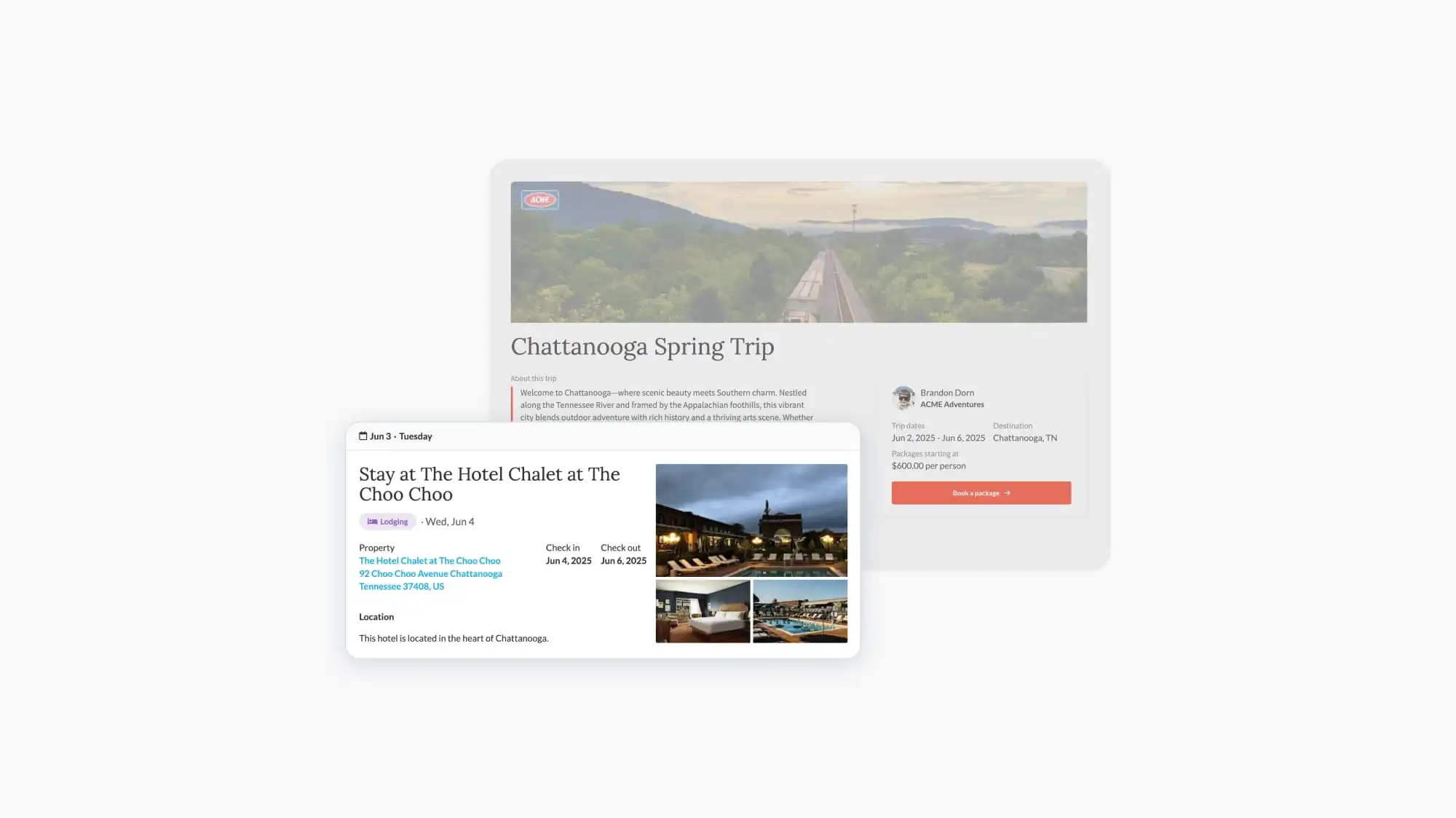

Group travel can be one of the fastest ways to scale a travel business. Done well, a single group booking generates more revenue than a handful of individual trips, and it opens the door to repeat clients who want to travel together year after year.
It can also be one of the most labor-intensive parts of the job. You're tracking deposits, chasing down forms, managing room assignments, and fielding messages from a dozen different travelers, all at the same time. Many advisors are doing this across a patchwork of spreadsheets, email threads, and payment links.
There's a better way, and that's exactly what we showed in TravelJoy's first-ever Groups Workshop.
This recap walks you through everything we covered, step by step, using a real example built from scratch during the session.
Group travel software helps travel advisors organize and automate the logistics of booking trips for multiple travelers at once: self-service booking, payment tracking, automated reminders, itinerary sharing, and client communication, all under one roof.
TravelJoy was built to handle all of this without requiring you to stitch together five different tools. The whole group booking lifecycle lives in one place, which means less manual work for you and a more polished experience for your travelers.
This workshop was about showing you what it actually looks like in practice.
Here's what tends to get advisors excited when they see the groups workflow in action:
For the demo, we started with a client named Nicole. She had an individual trip and itinerary already built in TravelJoy for a birthday trip to Costa Rica. Then she decided to invite her friends and family along, which meant converting that individual trip into a full group experience, with a booking page her guests could use to sign up and pay on their own.
Here's how we built it.
From the TravelJoy dashboard, click the blue "New" button, select "Group," give it a name, and you're done. The group is created and ready to build on.
You can build a group itinerary from scratch using TravelJoy's itinerary builder for travel agents, but if you've already built one for the trip, you don't have to start over. The Library feature lets you pull an existing itinerary into the group in seconds.
For Nicole's trip, we searched her Costa Rica itinerary in the Library, selected it, and all of the content transferred over instantly. If you've ever manually rebuilt an itinerary you already spent hours on, you'll appreciate how much time this saves.
Once travelers start booking, you can control exactly who sees what on the group itinerary. By default, everything is visible to everyone, so there's nothing to change unless you have specific items, like a private excursion or a particular flight, that only certain travelers should see.
This is where TravelJoy's group workflow really shines.
A TravelJoy group booking page combines your itinerary, an intake form, and a checkout flow into a single shareable link. Travelers can browse the trip, pick their package, fill out their information, and pay their deposit without any back-and-forth with you. Here's what you're configuring when you build one:
Traveler limits. Set the minimum and maximum number of travelers who can book together. For Nicole's trip, the hotel accommodated singles and couples, so we set a minimum of 1 and a maximum of 2.
Dates. You can have everyone traveling on the same dates, within a flexible date range, or choosing from a set of options.
Packages. These are the room or cabin options you're offering. Each package connects to a specific item on your group itinerary and can include occupancy-based pricing. Set a price for single occupancy and a separate price for double, and TravelJoy calculates the per-person cost automatically based on what the traveler selects. You can also cap inventory, and the page will mark a package as sold out once it's full.
Deposits and payment schedules. Set a deposit amount and a final payment due date. Reminders go out automatically, so you're not the one following up.
Discount codes. Add promo codes with a dollar amount off. Nicole wanted to offer $50 off for anyone who booked within 30 days, so we set that up with a custom code.
Travel insurance. TravelJoy integrates with Faye so travelers can add insurance directly at checkout.
Intake forms and task lists. Collect traveler information at the time of booking and optionally auto-assign tasks to their trip once they register.
When you're ready, hit Publish and share the link. Every booking that comes through after that automatically creates a trip, generates client profiles, saves the signed invoice, logs the authorized deposit, and queues up any task reminders you've set. The setup takes a few minutes. Everything else runs on its own.
To see what it looks like from the traveler's side, we went through a full booking during the demo. The experience is clean and straightforward: browse the itinerary, select a package, review the pricing breakdown, enter traveler details, apply a discount code if you have one, and pay. No confusion, no friction.
A few things that make group itinerary management smoother, whether you're new to TravelJoy or just getting started with groups:
Use the Library whenever you can. If an itinerary already exists for the trip leader, don't rebuild it. Pull it into the group and move on. You can also do this with individual itinerary items or whole sections.
Connect every package to an itinerary item. This is what makes visibility controls work and keeps everything organized as travelers book. If you're offering multiple packages, each one needs its own itinerary item to connect to.
Lean into personalization with visibility settings. The default setting shows everything to everyone. You can adjust it when you have content that's specific to certain travelers.
Build your templates once, use them everywhere. Intake form templates and task list templates save you from repeating the same setup across every group. We're covering templates in depth in our next workshop.
Once the booking page is published, TravelJoy automates the routine work for you. Payment reminders go out on schedule, tasks get assigned, and the Group Status tab keeps everything visible without you having to check in on each traveler individually.
The goal is to shift your time away from logistics and toward the parts of the job that actually require you: planning great trips and taking care of your clients.
The full workshop recording is available on our YouTube. You can also visit our Groups Help Center for step-by-step guides on everything covered here.
If you're not yet using TravelJoy and want to see this workflow in action for your own groups, start a free trial today.


.jpg)
.jpg)
.png)
-min.webp)
.webp)
.png)

.png)